 ChatPager
Google Chat alerts for every account you use
Chrome only alerts you for the profile you have open. ChatPager watches the rest from your Mac's menu bar and pages you the moment a message arrives.
It stays quiet when Chrome has it covered
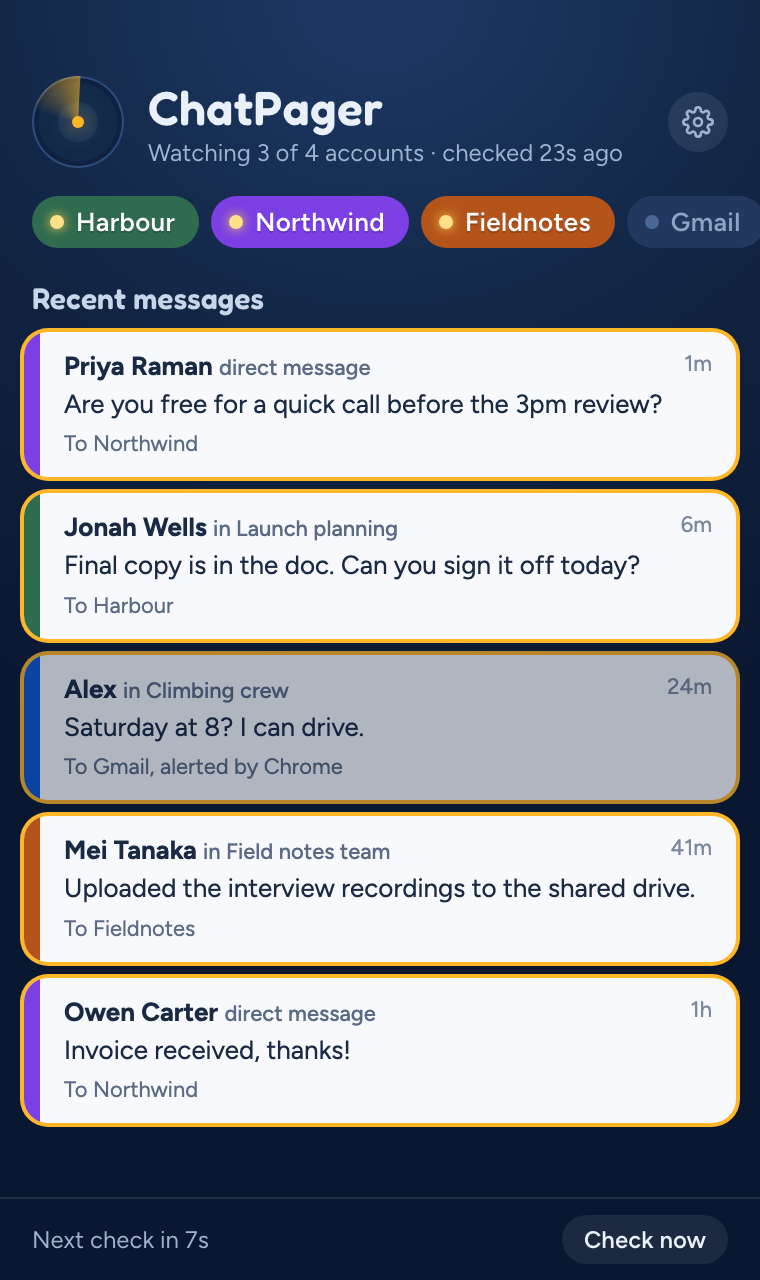
Each of your Google accounts gets a chip, coloured to match its Chrome profile. ChatPager checks which profiles you have open, so you're never told about the same message twice.
-
Northwind
Profile closed, so ChatPager pages you when a message arrives.
-
Gmail
Profile open in Chrome, so Chrome alerts you and ChatPager stays quiet.
Click the alert, land in the right account
Clicking a ChatPager alert opens the conversation in Gmail or Google Chat, in the Chrome profile that owns that account. No more replying from the wrong address.
- One alert per conversation. A busy space doesn't bury you in banners.
- Quiet hours. Choose times when ChatPager holds its alerts.
- Lives in the menu bar. Opens when you log in and stays out of the way.
Your messages never leave your Mac
ChatPager fetches your messages from Google directly, on your Mac. They never pass through us, so there's nowhere else for them to be copied to.
- Read-only. ChatPager can see new messages. It can't send, edit or delete anything.
- Sign-ins in your Keychain. Your Google sign-ins are encrypted by macOS.
- No tracking. No analytics, no ads, no account with us.
- Read the full privacy policy.
Try ChatPager on your Mac
ChatPager is nearly ready. Leave your email and we'll send you a download link and a beta price when it is. After that, it's US$19, once, with a 14-day free trial.